Tracking module#
The Tracking module provides end-to-end pipelines for object detection, ID
stabilisation, flow extraction, and analysis. All commands are exposed under
the bee track CLI group.
Configuration#
To create editable config files in your working directory:
bee config init
This writes:
tracking_config.yamltracking/custom_tracker.yaml
The CLI will automatically use a tracking_config.yaml in your current
working directory if present.
Commands#
Run the full pipeline on a single video file (detection, ID fixing, flow extraction):
bee track run-pipeline --input /path/to/video.mp4 --output /path/to/output_dir
Each step in the pipeline can also be run individually:
Run YOLO detection/tracking on a video file and save raw CSV output:
bee track run-yolo --model-path /path/to/model.pt --source-video /path/to/video.mp4 \
  --output-path /path/to/out.csv
Fix object IDs across frames on raw tracking CSV data:
bee track fix-ids /path/to/tracking.csv --output /path/to/fixed.csv --num-objects 5
Extract flow information (dx/dy/speed) on fixed tracking CSV data:
bee track extract-flow /path/to/fixed.csv --output /path/to/flow.csv
In addition, a command is provided to visualise tracking results on a video:
Visualise tracks on video:
bee track visualise-tracking --video /path/to/video.mp4 --csv /path/to/fixed.csv \
  --out /path/to/annotated.mp4
Batch processing#
If processing of multiple files is required, a batch-processing command is available. It runs the pipeline over all videos in a directory tree and writes outputs to per-video subdirectories.
Usage:
bee track batch-process --input-dir /path/to/videos
This will create a new directory called tracking_outputs in the current working directory, with subdirectories for each video containing the outputs.
To specify a different output directory name:
bee track batch-process --input-dir /path/to/videos --output-dir-name tracking_outputs
To filter videos by name (e.g. only process videos containing “hiveA” in the filename):
bee track batch-process --input-dir /path/to/videos --filter hiveA
Tutorial#
This walkthrough uses the test video at tests/data/sample_vid.mp4. This video contains 5 bees and a feeder, and is around 5 seconds long at 45fps:
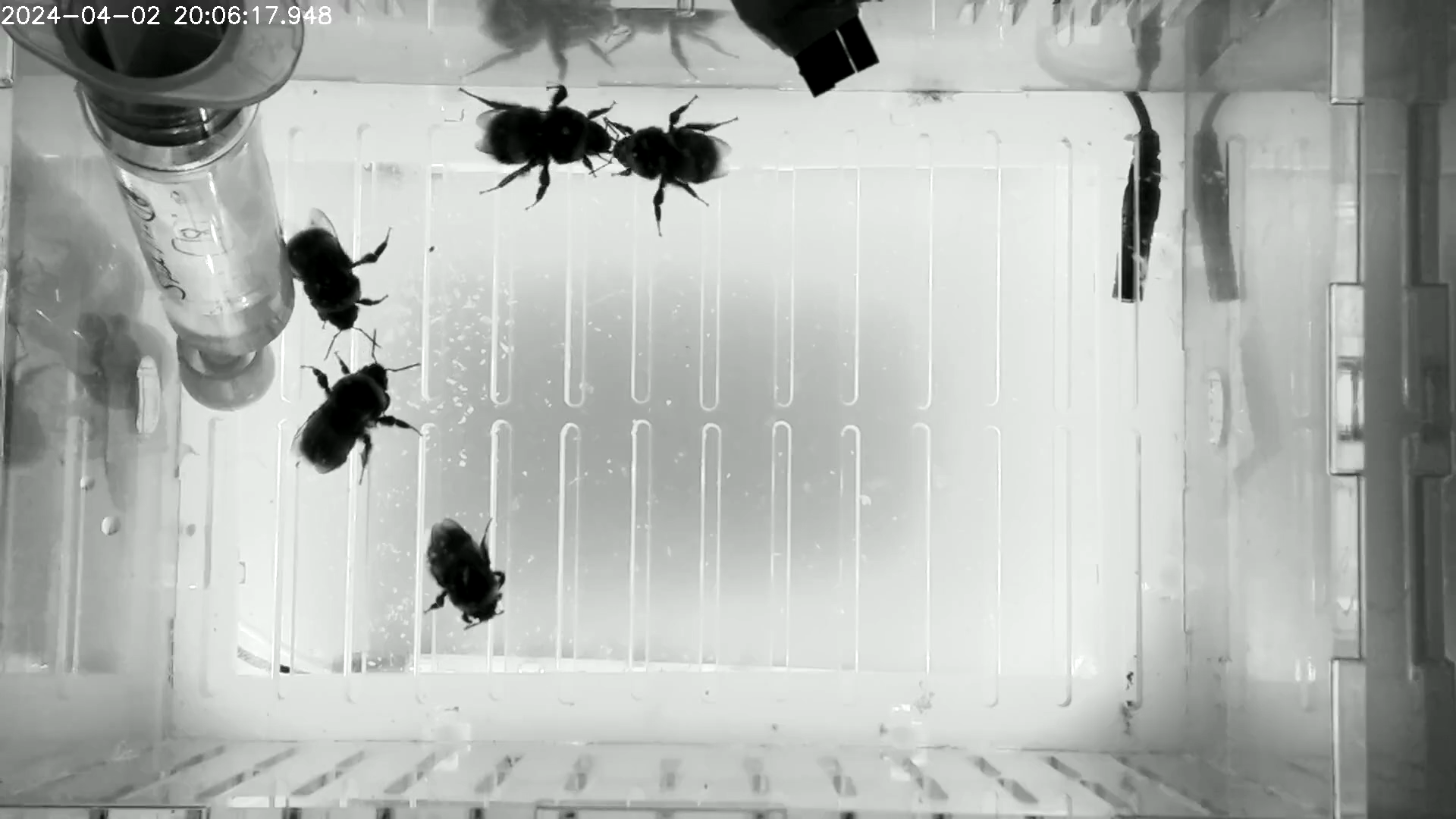
Sample frame from tests/data/sample_vid.mp4 around 2.4s.#
0) Initialise local config files#
Start by generating editable local config files in your working directory. This is optional but recommended if you want to change any defaults such as the model path or number of animals:
bee config init
This creates:
tracking_config.yamltracking/custom_tracker.yaml
tracking_config.yaml contains the main pipeline options you are most likely
to change (model path, confidence threshold, number of tracked objects, and
output CSV naming):
# YOLO Tracking Configuration File
model_path: "tracking/model/feeder_bee_YOLO.pt"
ultralytics_config: "tracking/custom_tracker.yaml" # Path to custom tracker config
conf_threshold: 0.0 # Minimum confidence for detections
xywh: true # Use (x, y, w, h) format for bounding boxes
track: true # Enable tracking
num_objects: 5 # Maximum number of objects to track with stable IDs
feeder_label: 1 # Class ID for feeder
# Suffixes for output CSV files
csv1_name: "yolo_tracking_raw.csv" # Raw tracking data
csv2_name: "yolo_tracking_fixed_ids.csv" # Tracking data with fixed IDs
csv3_name: "yolo_tracking_fixed_ids_velocity.csv" # Tracking data with velocity

required_cols: # Columns required in the CSV files
  - frame_id
  - class_id
  - x
  - y
  - w
  - h
  - track_id
  - conf
Common options to edit in tracking_config.yaml:
model_path: YOLO model file to use for tracking.conf_threshold: minimum detection confidence.num_objects: expected object count used during ID fixing.feeder_label: class ID to treat as feeder.csv1_name,csv2_name,csv3_name: output filename suffixes.
tracking/custom_tracker.yaml contains Ultralytics tracker tuning options
such as association thresholds and track buffering.
1) Run the full pipeline (recommended)#
This runs detection, ID fixing, and flow extraction in one command:
bee track run-pipeline --input tests/data/sample_vid.mp4 --output tutorial_outputs/pipeline
Expected outputs in tutorial_outputs/pipeline include:
sample_vid_yolo_tracking_raw.csvsample_vid_yolo_tracking_fixed_ids.csvsample_vid_yolo_tracking_fixed_ids_velocity.csv
2) Run each step individually#
If you want to inspect each stage, run the commands separately.
The YOLO step requires a model path. A model is included in this repository at
src/beehaviourlab/tracking/model/feeder_bee_YOLO.pt:
bee track run-yolo --model-path src/beehaviourlab/tracking/model/feeder_bee_YOLO.pt \
  --source-video tests/data/sample_vid.mp4 \
  --output-path tutorial_outputs/steps/sample_vid_yolo_tracking_raw.csv
Then fix IDs:
bee track fix-ids tutorial_outputs/steps/sample_vid_yolo_tracking_raw.csv \
  --output tutorial_outputs/steps/sample_vid_yolo_tracking_fixed_ids.csv --num-objects 5
Then extract frame by frame velocity and speed metrics:
bee track extract-flow tutorial_outputs/steps/sample_vid_yolo_tracking_fixed_ids.csv \
  --output tutorial_outputs/steps/sample_vid_yolo_tracking_fixed_ids_velocity.csv
3) Visualise tracking results#
Overlay tracks on the input video using the fixed-ID CSV:
bee track visualise-tracking --video tests/data/sample_vid.mp4 \
  --csv tutorial_outputs/steps/sample_vid_yolo_tracking_fixed_ids.csv \
  --out tutorial_outputs/steps/sample_vid_tracked.mp4
Example output frame:
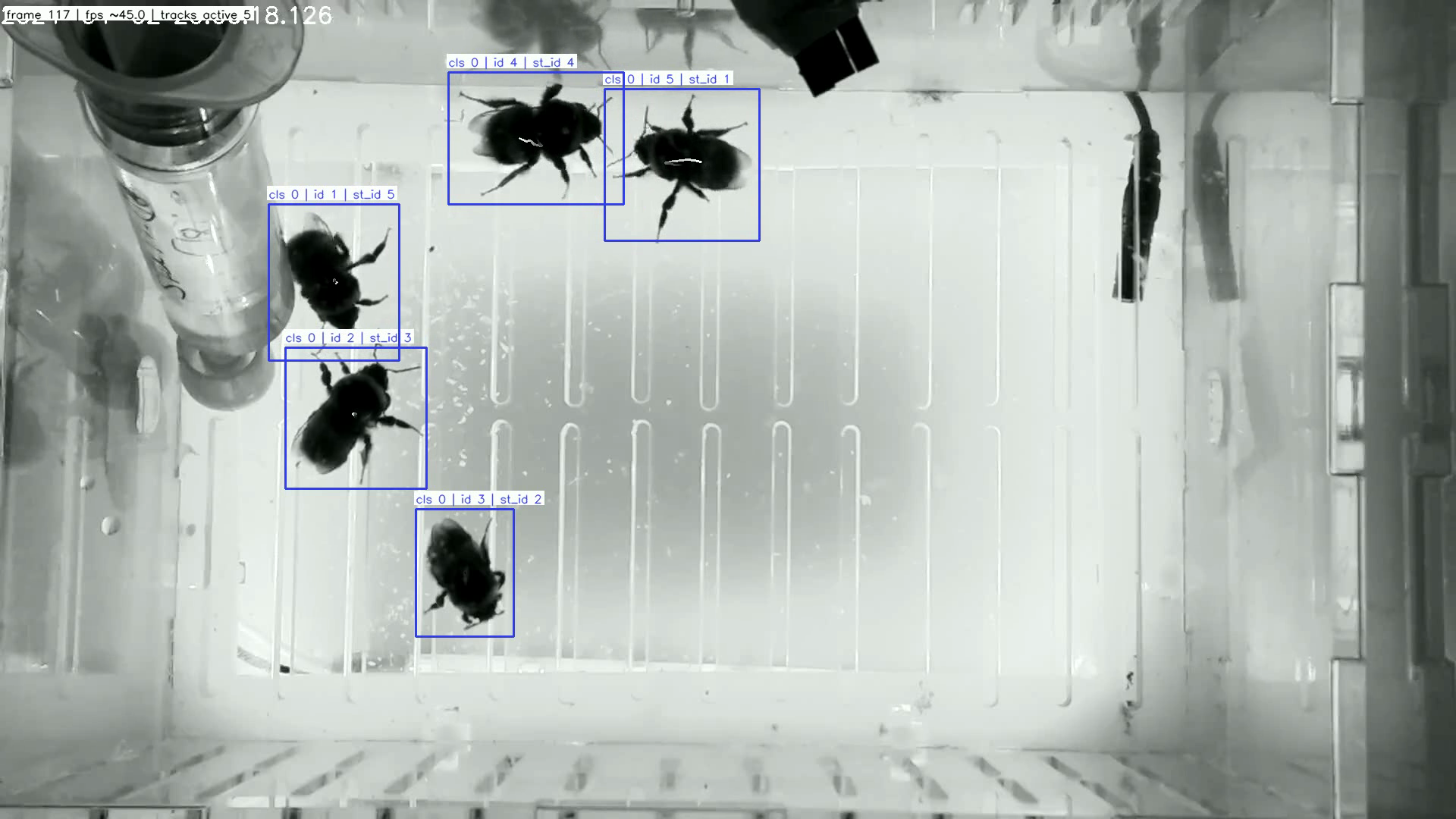
Visualised output frame around 2.6s with tracked IDs.#